Insurance Policy & Claims PDFs: Audit-Ready Output at Scale



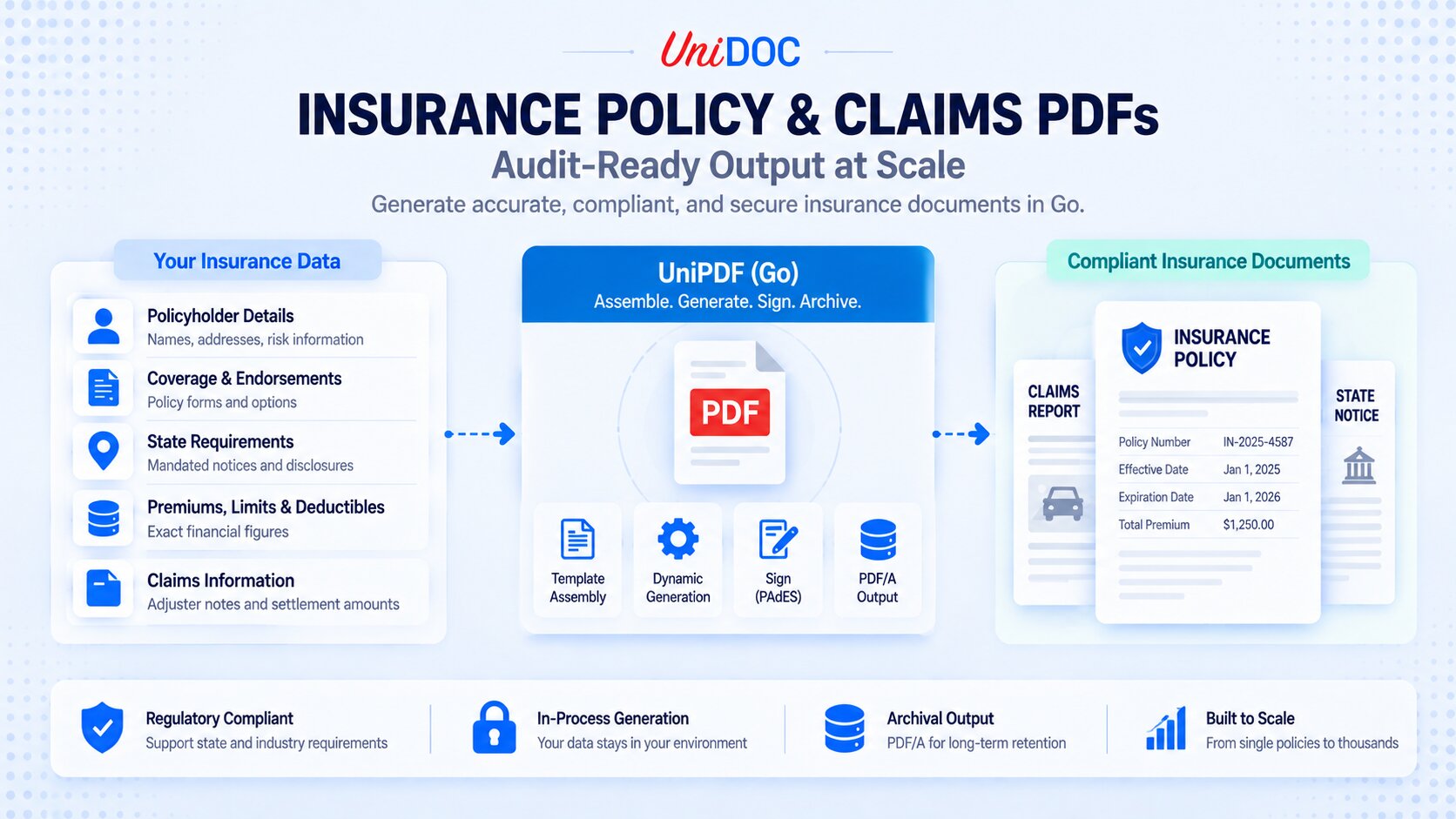
An insurance document is a regulated artifact. A declarations page states the limits and premium the carrier is bound to. A policy packet assembles coverage forms, endorsements, and state-mandated notices that a regulator expects to see, in the right combination for the insured’s jurisdiction. A claims document becomes part of the record if the settlement is ever disputed. When a limit is off by a digit, a required state notice is missing, or the wrong endorsement is attached, the cost is not a re-render. It is a filing defect, a market-conduct finding, or a coverage dispute.
That is why insurance document generation is a compliance problem before it is a formatting one, and why it gets harder, not easier, at scale. A carrier or insurtech binding and renewing policies produces these documents by the thousands, each assembled slightly differently depending on coverage, endorsements, and state. This guide covers what an insurance document pipeline in Go has to get right, and how to build one with UniPDF: exact figures, per-risk assembly, signatures, and archival output you can retain and audit.
Why Insurance Documents Are a Compliance Problem, Not a Formatting One
In the United States, insurance is regulated primarily at the state level, by each state’s department of insurance, with model laws coordinated through the National Association of Insurance Commissioners (NAIC). In practice that means several things the document layer has to respect. Policy forms and rates are often filed with, and in many states approved by, the regulator before they can be used, so the wording and structure that reach the insured are not arbitrary. Jurisdiction-specific notices and disclosures must appear when they apply. And standardized industry forms, such as the ACORD certificate of insurance, have an expected layout that downstream parties rely on.
The point for an engineering team is not to become a compliance officer. It is to recognize that the document is where filed language, correct figures, and the right per-state combination all have to land together. A document library does not make a carrier compliant; the carrier’s forms, filings, and process do. But the library is what either produces accurate, consistent, correctly assembled, retainable documents at volume, or quietly undermines all four.
What an Insurance Document Pipeline Has to Get Right
Five requirements recur across policy issuance, endorsement, and claims, and each maps to a concrete engineering decision.
- Exact figures. Limits, deductibles, premiums, and claim amounts have to be arithmetically exact and reproducible. Floating-point money drifts by a cent, and a figure that does not tie out on a declarations page is a defect. Money belongs in integer minor units, not
float64. - Per-risk assembly. A policy packet is not one fixed document. It is a declarations page plus the coverage forms, endorsements, and state notices that apply to this insured, in this state, with these options. The pipeline has to assemble the right sections conditionally, not render a single hard-coded layout.
- Filed, consistent layout. Because forms are filed and approved, the same input must always produce the same document. Layout belongs in versioned templates rather than scattered drawing code, so a wording change tracks to a form revision instead of a redeploy.
- Signatures that hold up. Bound policies and settled claims are often signed. Electronic signatures are enforceable for most US transactions under the federal ESIGN Act and state UETA, which are technology-neutral; PAdES is the widely adopted technical standard for a PDF signature that verifies and, for long-lived records, stays verifiable over time.
- Retention, archival, and data residency. Insurers carry multi-year record-retention obligations, which means archival-grade output (PDF/A) and an audit trail. Policy and claims documents also carry sensitive personal data, and health lines carry protected health information under HIPAA, where sending data to a third-party service requires a Business Associate Agreement. Generating in-process keeps the document layer out of that path entirely.
Building the Pipeline in Go
The examples below use UniPDF, which is pure Go and runs in-process, so policyholder and claimant data never leaves your environment and the whole thing compiles into your service binary.
Step 1: Initialize the License
UniPDF requires a license key. A free metered key from cloud.unidoc.io suits evaluation and cloud workloads. For carriers that cannot make outbound calls, an offline key validates locally, so the license check itself makes no network calls; offline keys are available through unidoc.io/pricing.
// license.go
package main

import (
    "os"

    "github.com/unidoc/unipdf/v5/common/license"
)

func init() {
    // Metered key: evaluation and cloud deployments.
    if err := license.SetMeteredKey(os.Getenv("UNIDOC_LICENSE_API_KEY")); err != nil {
        panic(err)
    }

    // For regulated or air-gapped deployments, load a signed offline key instead.
    // It validates locally with no network calls:
    //   key, err := os.ReadFile("unidoc.lic")
    //   if err != nil {
    //       panic(err)
    //   }
    //   if err := license.SetLicenseKey(string(key), "Your Company Name"); err != nil {
    //       panic(err)
    //   }
}
Step 2: Model the Risk, With Money as Integer Units
Everything on the document flows from the policy record. Model coverages, endorsements, and the resolved state notices explicitly, hold every monetary value in integer minor units, and format it as currency for display. Carry a form-version field so the output records exactly which filed template produced it.
// model.go
package main

import (
    "fmt"
    "strconv"
)

// Money is stored in integer minor units (cents) to keep premiums, limits, and
// deductibles exact. String formats it as currency and is safe at the int64
// bounds because it takes the magnitude in uint64.
type Money int64

func (m Money) String() string {
    neg := m < 0
    var mag uint64
    if neg {
        mag = uint64(-(m + 1)) + 1 // avoids overflow at math.MinInt64
    } else {
        mag = uint64(m)
    }
    d := strconv.FormatUint(mag/100, 10)
    var grouped []byte
    for i := 0; i < len(d); i++ {
        if i > 0 && (len(d)-i)%3 == 0 {
            grouped = append(grouped, ',')
        }
        grouped = append(grouped, d[i])
    }
    sign := ""
    if neg {
        sign = "-"
    }
    return fmt.Sprintf("%s$%s.%02d", sign, string(grouped), mag%100)
}

type Coverage struct {
    Name       string
    Limit      Money
    Deductible Money
    Premium    Money
}

type Endorsement struct {
    FormNumber string // filed form identifier, e.g. "CG 20 10 12 19"
    Title      string
}

type Policy struct {
    PolicyNumber   string
    Insured        string
    State          string // jurisdiction; drives which mandated notices apply
    EffectiveDate  string
    ExpirationDate string
    FormVersion    string // filed template revision, e.g. "decl_v2024-03"
    Coverages      []Coverage
    Endorsements   []Endorsement
    StateNotices   []string // resolved for the policy's jurisdiction
    TotalPremium   Money
}

// TotalPremiumOf sums the coverage premiums, so the total on the declarations
// page always reconciles with the schedule rather than being entered by hand.
func TotalPremiumOf(cs []Coverage) Money {
    var t Money
    for _, c := range cs {
        t += c.Premium
    }
    return t
}

// stateNotices maps a jurisdiction to the notices your filings require. This is
// the compliance-as-data core: adding a state is a data change, not a code change.
var stateNotices = map[string][]string{
    "CA": {"California Fair Claims Settlement Practices notice.", "California fraud warning."},
    "TX": {"Texas plain-language summary notice.", "Texas fraud warning."},
}

func resolveNotices(state string) []string {
    return stateNotices[state]
}
Resolving notices from the policy’s State is where your compliance rules live, and keeping the mapping in data, next to the policy, is what lets one template serve every state. When you build the policy, set StateNotices with resolveNotices(p.State), TotalPremium with TotalPremiumOf(p.Coverages), and FormVersion to the filed template revision you rendered from, so a stored document says exactly which form produced it.
Step 3: Assemble the Document From a Template
Because the layout is filed and must be reproducible, keep it in a template rather than in drawing code. UniPDF’s creator templates use an XML-style markup executed as a Go text/template, so the schedule, endorsements, and notices are injected as data, and the per-risk assembly happens through ordinary template logic. A minimal excerpt of a declarations schedule, the total premium, the attached endorsements, and conditional state notices:
<table columns="4" column-widths="0.4 0.2 0.2 0.2" margin="10 0 0 0">
    <table-cell><paragraph><text-chunk font="helvetica-bold">Coverage</text-chunk></paragraph></table-cell>
    <table-cell><paragraph><text-chunk font="helvetica-bold">Limit</text-chunk></paragraph></table-cell>
    <table-cell><paragraph><text-chunk font="helvetica-bold">Deductible</text-chunk></paragraph></table-cell>
    <table-cell><paragraph><text-chunk font="helvetica-bold">Premium</text-chunk></paragraph></table-cell>
    {{range .Coverages}}
    <table-cell><paragraph><text-chunk>{{.Name}}</text-chunk></paragraph></table-cell>
    <table-cell><paragraph text-align="right"><text-chunk>{{.Limit}}</text-chunk></paragraph></table-cell>
    <table-cell><paragraph text-align="right"><text-chunk>{{.Deductible}}</text-chunk></paragraph></table-cell>
    <table-cell><paragraph text-align="right"><text-chunk>{{.Premium}}</text-chunk></paragraph></table-cell>
    {{end}}
</table>

<paragraph margin="8 0 0 0" text-align="right"><text-chunk font="helvetica-bold">Total Premium: {{.TotalPremium}}</text-chunk></paragraph>

{{if .Endorsements}}
<paragraph margin="12 0 0 0"><text-chunk font="helvetica-bold">Endorsements</text-chunk></paragraph>
{{range .Endorsements}}
<paragraph margin="4 0 0 0"><text-chunk>{{.FormNumber}}: {{.Title}}</text-chunk></paragraph>
{{end}}
{{end}}

{{if .StateNotices}}
<paragraph margin="12 0 0 0"><text-chunk font="helvetica-bold">State Notices</text-chunk></paragraph>
{{range .StateNotices}}
<paragraph margin="4 0 0 0"><text-chunk>{{.}}</text-chunk></paragraph>
{{end}}
{{end}}
The {{range .Coverages}} builds the schedule, {{.TotalPremium}} prints the derived total, and the {{if .Endorsements}} and {{if .StateNotices}} blocks add the endorsements and jurisdiction-specific notices only when they apply. The same template renders a Texas policy and a California policy correctly, because the difference lives in the data, not in a second template.
The Go side reads the template once and renders one packet per policy. Applying the PDF/A profile here, on the creator, makes every rendered policy archival by default rather than by a separate conversion step (the enableArchival helper comes in Step 4).
// render.go
package main

import (
    "bytes"
    "fmt"
    "os"

    "github.com/unidoc/unipdf/v5/creator"
)

func renderPolicy(tplBytes []byte, p Policy, outputPath string) error {
    c := creator.New()
    enableArchival(c) // write PDF/A-2b; defined in Step 4
    c.SetPageMargins(50, 50, 60, 60)

    // A fresh reader per render: DrawTemplate consumes the reader it is given.
    if err := c.DrawTemplate(bytes.NewReader(tplBytes), p, nil); err != nil {
        return fmt.Errorf("draw policy %q: %w", p.PolicyNumber, err)
    }

    // Temp file plus rename, so a mid-render failure never leaves a partial
    // policy document at the destination path.
    tmp := outputPath + ".tmp"
    if err := c.WriteToFile(tmp); err != nil {
        os.Remove(tmp) // a half-written temp file is never useful
        return fmt.Errorf("write policy %q: %w", p.PolicyNumber, err)
    }
    return os.Rename(tmp, outputPath)
}
Because Money implements String(), {{.Limit}} and {{.Premium}} render as formatted currency directly, with no helper functions to register. For a $1,000,000 limit with a $2,500 deductible, the schedule shows $1,000,000.00 and $2,500.00, straight from the integer values.
Step 4: Sign, Archive, and Retain
A bound policy or a settled claim is a record, so the last stage has two jobs: make the file archival-grade (PDF/A) and make the signature one that still verifies years from now (PAdES with long-term validation). Order matters: apply PDF/A when the document is first written, then sign with incremental updates so the signature never rewrites the conforming body.
Archive: Write PDF/A From the Creator
UniPDF exposes the underlying PdfWriter just before output. Apply a PDF/A profile there, so every rendered policy is archival by default. PDF/A-2b is a common choice for machine-generated business documents; swap in NewProfile1B or NewProfile3B if your retention policy names one.
// archive.go
package main

import (
    "fmt"
    "os"

    "github.com/unidoc/unipdf/v5/creator"
    "github.com/unidoc/unipdf/v5/model"
    "github.com/unidoc/unipdf/v5/model/pdfa"
)

// archivalProfile is the PDF/A conformance level every policy is written at.
// Returning model.StandardImplementer (StandardApplier + StandardValidator)
// means the same profile both writes and validates, so a retention-policy
// change really is a one-line diff and the two can never drift apart.
func archivalProfile() model.StandardImplementer {
    return pdfa.NewProfile2B(nil) // nil = default options
}

// enableArchival hooks the creator so the PDF/A profile is applied on write.
// Call it on the creator in renderPolicy before DrawTemplate and WriteToFile.
func enableArchival(c *creator.Creator) {
    c.SetPdfWriterAccessFunc(func(w *model.PdfWriter) error {
        w.ApplyStandard(archivalProfile())
        return nil
    })
}

// verifyArchival re-reads a finished file and checks it against the same
// profile it was written at. Run it on the signed output, so a signature
// appearance can never silently break conformance.
func verifyArchival(path string) error {
    f, err := os.Open(path)
    if err != nil {
        return err
    }
    defer f.Close()

    r, err := model.NewCompliancePdfReader(f)
    if err != nil {
        return fmt.Errorf("open %s for compliance check: %w", path, err)
    }
    profile := archivalProfile()
    if err := profile.ValidateStandard(r); err != nil {
        return fmt.Errorf("%s is not %s: %w", path, profile.StandardName(), err)
    }
    return nil
}
Sign: PAdES B-LTA in Three Incremental Updates
A PAdES signature that must stay verifiable after the signing certificate expires needs the validation data (certificate chain, OCSP or CRL responses) embedded in the file, plus a document timestamp that covers all of it. UniPDF builds that as three incremental updates on the same PDF: the B-LT signature, a pass that persists the Document Security Store, and a document timestamp that lifts the result to B-LTA.
How the private key is loaded, from a PKCS#12 bundle or a secrets manager, is a deployment decision. Keep it behind a small struct so the pipeline never handles key material directly.
One constraint shapes that decision: the NewEtsiPAdES* constructors take a concrete *rsa.PrivateKey (or *ecdsa.PrivateKey), so they need a key your process can hold in memory. Hardware HSM and cloud KMS keys are deliberately non-exportable and only ever surface as a signing interface, so they do not fit this struct. Signing with one means a handler that delegates the signing operation instead: see the PKCS#11 HSM example (the one path that needs CGO) and the AWS KMS and Google Cloud KMS external-signing examples.
// sign.go
package main

import (
    "bytes"
    "crypto"
    "crypto/rsa"
    "crypto/x509"
    "fmt"
    "os"
    "time"

    "github.com/unidoc/unipdf/v5/annotator"
    "github.com/unidoc/unipdf/v5/core"
    "github.com/unidoc/unipdf/v5/model"
    "github.com/unidoc/unipdf/v5/model/sighandler"
)

// Signer holds the carrier's signing identity. Populate it once at startup from
// a PKCS#12 bundle or your secrets manager; nothing here is read per document.
// For a non-exportable HSM or KMS key, use an external signing handler instead.
type Signer struct {
    Key    *rsa.PrivateKey
    Cert   *x509.Certificate
    CACert *x509.Certificate
    TSAURL string // RFC 3161 timestamp authority; required for B-T and above
    Font   *model.PdfFont // embedded font for the signature appearance
}

// LoadAppearanceFont loads the font the signature appearance draws with. It has
// to be a real font file, embedded in the output, because the standard-14
// fonts UniPDF falls back to are not embedded and PDF/A forbids that.
func LoadAppearanceFont(path string) (*model.PdfFont, error) {
    font, err := model.NewCompositePdfFontFile(path)
    if err != nil {
        return nil, fmt.Errorf("load signature appearance font %s: %w", path, err)
    }
    return font, nil
}

// signPolicy applies a PAdES B-LTA signature to an already-rendered policy PDF
// and writes the signed file atomically to outputPath.
func signPolicy(s Signer, p Policy, inputPath, outputPath string) error {
    in, err := os.ReadFile(inputPath)
    if err != nil {
        return err
    }

    // Pass 1: PAdES B-LT signature with embedded validation data.
    ap, err := appenderFor(in)
    if err != nil {
        return err
    }
    handler, err := sighandler.NewEtsiPAdESLevelLT(s.Key, s.Cert, s.CACert, s.TSAURL, ap)
    if err != nil {
        return fmt.Errorf("pades handler: %w", err)
    }
    sig := model.NewPdfSignature(handler)
    sig.SetName("Carrier binding signature")
    sig.SetReason(fmt.Sprintf("Policy %s bound", p.PolicyNumber))
    sig.SetDate(time.Now(), "")
    if err := sig.Initialize(); err != nil {
        return fmt.Errorf("init signature: %w", err)
    }

    opts := annotator.NewSignatureFieldOpts()
    // PDF/A requires every font to be embedded. The appearance is drawn in an
    // incremental update, after the profile ran on the creator, so nothing
    // embeds a font for us: without this the default is the built-in,
    // non-embedded Helvetica and verifyArchival rejects the signed file.
    opts.Font = s.Font
    opts.FontSize = 9
    opts.Rect = []float64{50, 40, 300, 100} // visible appearance on page 1
    field, err := annotator.NewSignatureField(sig, []*annotator.SignatureLine{
        annotator.NewSignatureLine("Policy", p.PolicyNumber),
        annotator.NewSignatureLine("Insured", p.Insured),
        annotator.NewSignatureLine("Effective", p.EffectiveDate),
    }, opts)
    if err != nil {
        return fmt.Errorf("signature field: %w", err)
    }
    field.T = core.MakeString("CarrierSignature")
    if err := ap.Sign(1, field); err != nil {
        return fmt.Errorf("sign policy %q: %w", p.PolicyNumber, err)
    }
    var pass1 bytes.Buffer
    if err := ap.Write(&pass1); err != nil {
        return err
    }

    // Pass 2: persist the DSS so revocation data lands in the file.
    ap2, err := appenderFor(pass1.Bytes())
    if err != nil {
        return err
    }
    ap2.SetDSS(ap.GetDSS())
    var pass2 bytes.Buffer
    if err := ap2.Write(&pass2); err != nil {
        return err
    }

    // Pass 3: document timestamp, which makes the signature B-LTA.
    ap3, err := appenderFor(pass2.Bytes())
    if err != nil {
        return err
    }
    tsHandler, err := sighandler.NewDocTimeStamp(s.TSAURL, crypto.SHA256)
    if err != nil {
        return fmt.Errorf("timestamp handler: %w", err)
    }
    ts := model.NewPdfSignature(tsHandler)
    ts.SetName("Document timestamp")
    ts.SetDate(time.Now(), "")
    if err := ts.Initialize(); err != nil {
        return err
    }
    tsOpts := annotator.NewSignatureFieldOpts()
    tsOpts.Font = s.Font                // embedded here too, for the same reason
    tsOpts.Rect = []float64{0, 0, 0, 0} // invisible
    tsField, err := annotator.NewSignatureField(ts, []*annotator.SignatureLine{
        annotator.NewSignatureLine("Reason", "Archival timestamp"),
    }, tsOpts)
    if err != nil {
        return err
    }
    if err := ap3.Sign(1, tsField); err != nil {
        return fmt.Errorf("timestamp policy %q: %w", p.PolicyNumber, err)
    }

    // Same temp-file-plus-rename discipline as renderPolicy.
    tmp := outputPath + ".tmp"
    if err := ap3.WriteToFile(tmp); err != nil {
        os.Remove(tmp)
        return err
    }
    return os.Rename(tmp, outputPath)
}

// appenderFor opens an in-memory PDF for an incremental update.
func appenderFor(pdf []byte) (*model.PdfAppender, error) {
    r, err := model.NewPdfReader(bytes.NewReader(pdf))
    if err != nil {
        return nil, err
    }
    return model.NewPdfAppender(r)
}
Retain
Wire the three stages together and keep what an examiner will ask for: the policy data that produced the document, the form version, the signed PDF/A, and a hash of it so you can prove the retained file is unaltered.
// pipeline.go
package main

import (
    "crypto/sha256"
    "encoding/hex"
    "io"
    "os"
    "path/filepath"
)

// RetentionRecord is what you keep for an examiner: which template produced the
// document, where the signed PDF/A lives, and a hash to prove it is unaltered.
type RetentionRecord struct {
    PolicyNumber string
    FormVersion  string
    SignedPath   string
    SHA256       string
}

func issue(s Signer, tplBytes []byte, p Policy, dir string) (RetentionRecord, error) {
    unsigned := filepath.Join(dir, p.PolicyNumber+".unsigned.pdf")
    signed := filepath.Join(dir, p.PolicyNumber+".pdf")

    if err := renderPolicy(tplBytes, p, unsigned); err != nil {
        return RetentionRecord{}, err
    }
    if err := signPolicy(s, p, unsigned, signed); err != nil {
        return RetentionRecord{}, err
    }
    // Never leave a file that fails its own archival check sitting at the path
    // a retention job would later pick up. Clear both and surface the error.
    if err := verifyArchival(signed); err != nil {
        os.Remove(signed)
        os.Remove(unsigned)
        return RetentionRecord{}, err
    }
    if err := os.Remove(unsigned); err != nil {
        return RetentionRecord{}, err
    }

    sum, err := fileSHA256(signed)
    if err != nil {
        return RetentionRecord{}, err
    }
    return RetentionRecord{
        PolicyNumber: p.PolicyNumber,
        FormVersion:  p.FormVersion,
        SignedPath:   signed,
        SHA256:       sum,
    }, nil
}

func fileSHA256(path string) (string, error) {
    f, err := os.Open(path)
    if err != nil {
        return "", err
    }
    defer f.Close()
    h := sha256.New()
    if _, err := io.Copy(h, f); err != nil {
        return "", err
    }
    return hex.EncodeToString(h.Sum(nil)), nil
}
Store the returned RetentionRecord alongside the signed file. Together with the policy data and the FormVersion, it is the audit trail: the exact template, the exact bytes, and a hash that proves neither changed.
Two practical notes. First, PDF/A-2 permits digital signatures, but the signature appearance is content like any other, so fonts it draws with must be embedded; that is why the validation runs on the signed output. Second, if your PDF/A validator objects to the Document Security Store, sign at B-T instead and keep the validation data in your retention system alongside the file. Both are policy choices your compliance team makes once and the pipeline then enforces.
Compliance and Data Residency Considerations
A few points worth stating carefully, because in insurance the details are the point:
- The library helps you produce compliant documents; it does not confer compliance. Meeting your state filings and disclosure obligations is a function of your forms, your rate and form filings, and your process. The document engine’s job is to render the filed language and the correct figures consistently, assemble the right sections per risk, and keep the output signable and retainable, so it does not become the weak link.
- Data residency is an architecture decision. Because UniPDF runs in-process as pure Go, and an offline license key makes no outbound calls, policyholder and claimant data stays inside your infrastructure. For health lines under HIPAA, that means the document layer needs no third-party service and therefore no Business Associate Agreement, and a much simpler vendor review, since no PHI ever leaves your environment. A commercial library compiled into your binary still goes through the usual third-party software review — SBOM entry, licensing, security questionnaire — but that is a very different conversation from a processor handling patient data.
- Assembly correctness is a compliance control, not a convenience. Driving section and notice selection from the policy’s data, rather than from branching render code, is what makes the per-state combination auditable and testable. It is far easier to prove that California policies receive the California notices when that mapping is data you can inspect.
- Retention is a first-class requirement. Treat archival output and a durable, reproducible copy as part of the pipeline, not an afterthought, since the record you can produce years later is the one that matters in a dispute or exam.
Frequently Asked Questions
How do you generate insurance policy documents in Go?
Model the policy as structured data with money in integer units, resolve the coverages, endorsements, and state notices that apply, then assemble the document from a template using ordinary template logic ({{range}} for the coverage schedule, {{if}} for endorsements and jurisdiction-specific notices), and finally sign and archive the result. UniPDF renders, signs (PAdES), and produces archival PDF/A output in pure Go, in-process.
Why not use float64 for premiums and limits?
Floating-point cannot represent most decimal cent values exactly, so totals drift and stop reconciling. On a declarations page a figure that does not tie out is a defect. Store money as integer minor units and format explicitly.
How do you handle state-specific notices and endorsements?
Keep the per-jurisdiction rules in data: resolve the applicable notices and endorsements from the policy’s state, attach them to the policy record, and let one template render them conditionally. That keeps the state combination auditable, and it avoids maintaining a separate template per jurisdiction.
Can insurance documents be generated without sending data to a third party?
Yes. UniPDF is pure Go and runs in-process, and with an offline license key it makes no outbound network calls, so policyholder and claimant data stays inside your infrastructure. For health lines under HIPAA, that removes the need for a Business Associate Agreement and narrows the vendor review to the usual third-party software checks — SBOM, licensing, security questionnaire — rather than a review of a service that handles PHI.
Does UniPDF require CGO?
No. The core UniPDF library is pure Go and builds with CGO_ENABLED=0, so it compiles into your service binary with no native dependency. (Optional hardware-HSM signing through PKCS#11 is the one path that uses CGO.)
Further Reading
- UniPDF product overview for the full feature scope across generation, forms, signatures, and archival
- Generating PDF Invoices with Go and UniDoc for a related template-driven financial document
- Applying Digital Signature to Your PDF for PAdES signing in Go
- UniPDF Getting Started Guide for a first working document
- UniPDF GitHub examples repository for runnable Go across major use cases
Conclusion
Insurance document generation looks like a rendering task and behaves like a compliance one. The figures have to be exact, the packet assembled correctly for the risk and the state, the signature legally recognized, and the output retainable and auditable, often without policyholder data ever leaving your infrastructure. Those are regulatory requirements that resolve into concrete engineering decisions: integer-unit money, data-driven per-risk assembly, filed templates, PAdES signing, archival output, and in-process generation.
UniPDF gives Go insurance and insurtech teams those primitives in one pure-Go dependency, from a named commercial vendor you can place in an SBOM and reach under an SLA. When the document is a policy or a claim, reliability at the document layer is not a convenience. It is part of staying compliant at scale.
Build your insurance document pipeline on UniPDF. Start a free trial or read the docs.