Key Factors in Go Office Document Collaboration



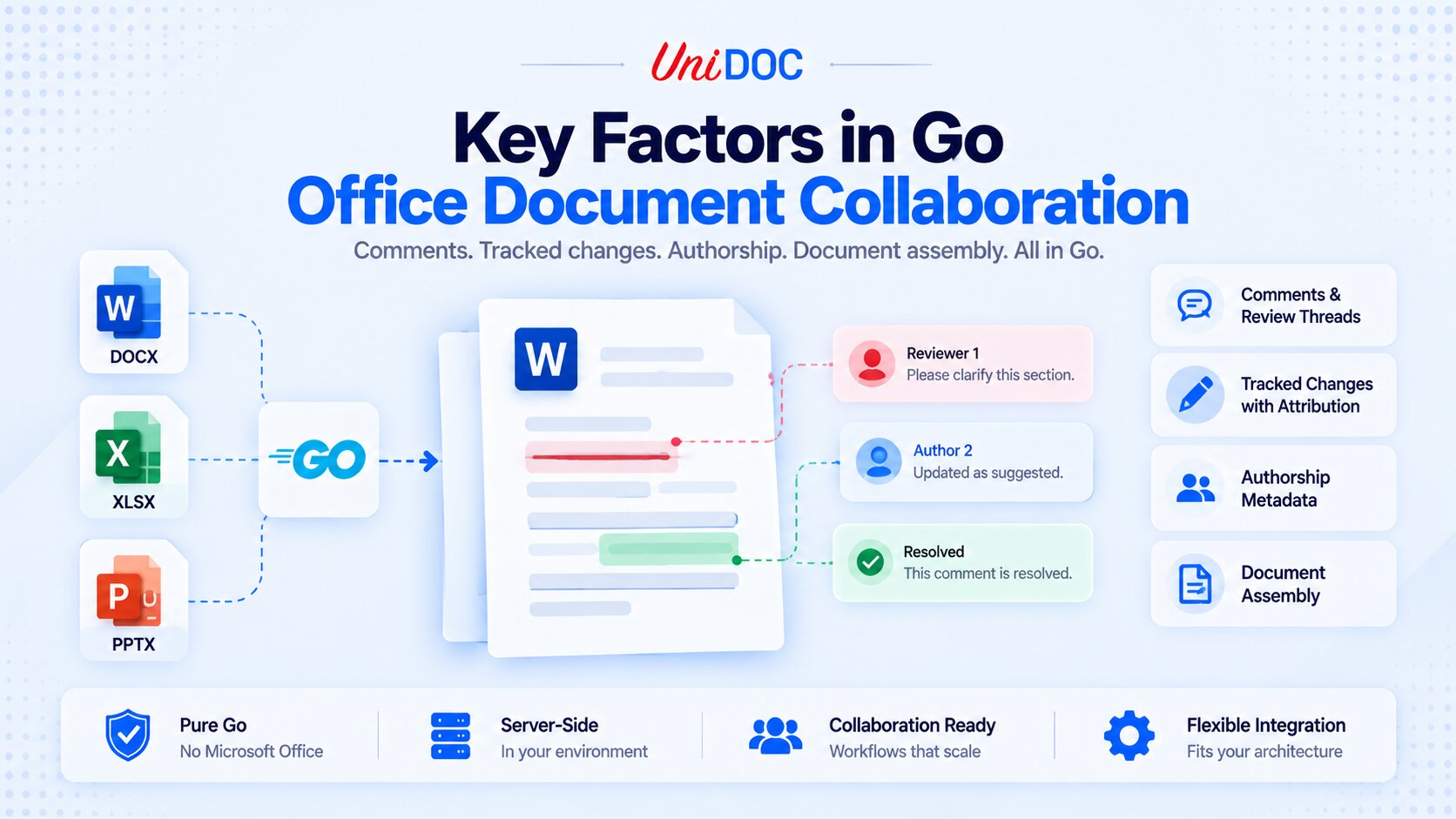
Collaboration on Office documents splits into two layers, and knowing which one you are building is where to start: the real-time layer (the live cursors and simultaneous typing you see in a browser editor) and the document layer (the comments, tracked changes, authorship, and assembled contributions stored inside the .docx file). In Go, UniOffice handles the document layer: your service can work with those collaboration artifacts server-side, with no Microsoft Office and no browser. The real-time sync layer, if you need it, is your application’s job.
This guide covers what matters when you build the document layer of a collaboration or review workflow in Go: comments and review threads, tracked changes with attribution, authorship metadata, assembling contributions, and the boundary that decides how the pieces fit with your live-editing layer. Each one maps to a concrete UniOffice capability.
If your workflow is broader than the document itself (routing, approvals, storage), our Building Golang Powered Document Workflows: A Complete Guide covers the orchestration around these building blocks.
First, the Boundary: Document Layer vs Real-Time Sync
UniOffice is not a real-time co-editing engine. It does not provide live cursors, operational transforms, or CRDT sync, and it does not run in the browser. What it does is manipulate the collaboration data that lives inside an Office file: the comment threads, the tracked insertions and deletions, the author and last-modified metadata, and the content itself when you assemble contributions.
That distinction is what everything else hangs on. If you are building Google Docs-style simultaneous editing, the live layer, the WebSocket fan-out, and the conflict resolution are yours to build (or to buy from a real-time editing SDK). UniOffice is what your backend uses to turn that activity into a correct, reviewable .docx, and to read one back.
The two compose cleanly: the sync layer decides what the document should say; UniOffice reads and writes what it does say. Everything below is the document layer, and all of it runs in pure Go, in-process.
Setup: One License, No Microsoft Office
The document-layer features need only UniOffice. There is no PDF conversion here, so no separate UniPDF setup or conversion step, though UniOffice pulls in UniPDF as a transitive dependency regardless. Add the library and set a license key once at startup.
go get github.com/unidoc/unioffice/v2
// license.go
package main

import (
    "os"

    "github.com/unidoc/unioffice/v2/common/license"
    "github.com/unidoc/unioffice/v2/common/tempstorage/memstore"
)

func init() {
    // Keep UniOffice's temp files in memory and report usage without an on-disk
    // cache, so the service works on a read-only or scratch container filesystem.
    memstore.SetAsStorage()
    license.SetMeteredKeyPersistentCache(false)

    if err := license.SetMeteredKey(os.Getenv("UNIDOC_LICENSE_API_KEY")); err != nil {
        panic(err)
    }
}
A free metered key from cloud.unidoc.io works for evaluation. It reports usage (a license check, not your document contents) to cloud.unidoc.io, so it needs outbound network access. For a regulated or air-gapped backend, use an offline key instead; you load it with SetLicenseKey(key, "Your Company Name"), and it validates locally with no network calls.
Two defaults also write to disk, which matters in a container. Reading a .docx extracts its parts into a temp directory (which doc.Close() removes), and the metered key caches usage on disk. On a read-only or scratch filesystem both would fail, which is why the init above switches UniOffice to in-memory temp storage with memstore.SetAsStorage() and turns the metered cache off with SetMeteredKeyPersistentCache(false).
Comments and Review Threads
Comments are the backbone of a review workflow, and UniOffice models them the way Word’s Comments pane does: a thread has a root comment, replies hang off it, and the thread can be marked resolved. You can add threads programmatically and read existing ones back.
// comments.go
package main

import (
    "fmt"

    "github.com/unidoc/unioffice/v2/document"
)

// addReviewThread attaches a comment to a paragraph, adds a reply, and resolves it.
func addReviewThread(outPath string) error {
    doc := document.New()
    defer doc.Close()

    para := doc.AddParagraph()
    cmID := para.AddComment("Reviewer", "Please tighten this clause.")
    para.AddRun().AddText("The parties agree to the following terms.")
    para.CloseComment(cmID)

    root := doc.Comment(cmID)
    if _, err := root.AddReply("Author", "Done, simplified."); err != nil {
        return err
    }
    root.SetDone(true) // mark the thread resolved

    return doc.SaveToFile(outPath)
}

// listThreads walks every comment thread, printing roots and their replies.
func listThreads(doc *document.Document) {
    if !doc.HasComments() {
        return
    }
    for _, c := range doc.Comments() {
        if c.IsReply() {
            continue // replies are printed under their root below
        }
        fmt.Printf("#%d %s: %s\n", c.ID(), c.Author(), c.Text())
        for _, r := range c.Replies() {
            fmt.Printf("   reply by %s: %s\n", r.Author(), r.Text())
        }
    }
}
AddComment opens a thread and returns its ID, CloseComment ends the commented range, AddReply adds a reply to the thread, and SetDone(true) resolves it. Replies form a flat thread: a reply to a reply still attaches to the root comment, which is what a review UI should expect.
On the read side, Comments() returns every comment, IsReply() separates roots from replies, and Replies() walks a thread, which is what you need to render a review UI or export a comment report.
One compatibility note: SetDone stores the resolved flag in the Word 2013-and-later commentsExtended part, so older or non-Word viewers may not show the thread as resolved even though the flag is there. The same part holds the reply links, so in a file without it IsReply() and Replies() treat every comment as a root.
Tracked Changes With Attribution
A review is not only comments; it is edits that a person can accept or reject, each attributed to who made it and when. UniOffice writes tracked insertions and deletions with an author and timestamp, the same revision data Word reads. Use UTC so every revision carries one consistent clock; note that Word shows the time as written, without converting it to the reviewer’s zone. Comment timestamps from AddComment use the process’s local time and take no parameter, so run the service with TZ=UTC if you want them to match.
// revisions.go
package main

import (
    "time"

    "github.com/unidoc/unioffice/v2/document"
    "github.com/unidoc/unioffice/v2/schema/soo/wml"
)

// trackedEdits records an insertion and a deletion as attributed revisions.
func trackedEdits(outPath string) error {
    doc := document.New()
    defer doc.Close()

    // Optional: put the document in Track Changes mode so a reviewer's own
    // later edits in Word are tracked too. It is not required to write the
    // revisions below.
    doc.Settings.X().TrackRevisions = wml.NewCT_OnOff()

    p := doc.AddParagraph()
    p.AddInsertedText("Added during legal review.", "00A1B2C3", "Reviewer", time.Now().UTC(), 0)

    p = doc.AddParagraph()
    p.AddDeletedText("Removed during legal review.", "00B2C3D4", "Reviewer", time.Now().UTC(), 1)

    return doc.SaveToFile(outPath)
}
You do not have to enable Track Changes to write revisions: AddInsertedText and AddDeletedText record the w:ins and w:del elements on their own.
The call signature is AddInsertedText(text, revNum, author, time, id). The revNum (here "00A1B2C3") is the run’s revision-save ID, an rsid, which the OOXML schema defines as an 8-hex-digit value (ST_LongHexNumber), so pad shorter values to eight digits. The final id (an int64, here 0 and 1) is each change’s unique revision ID, so give every insertion and deletion a distinct one. To read revisions back, walk the document body for those w:ins and w:del elements; unlike comments, there is no single Revisions() accessor.
Each edit carries the author and time, so the downstream reviewer sees who changed what, and their editor can accept or reject each revision. That attribution is useful provenance, but it is not a tamper-proof audit trail: the author names and timestamps are plain, editable text, and Word rewrites the last-modified fields the next time anyone saves. For an audit trail you can rely on, keep a server-side log of who did what, or apply a digital signature.
Authorship and Document Metadata
The document’s core properties carry its provenance: who authored it, who last touched it, and when it was last modified. Set them so the file itself records that context, using UTC for the same time-zone reason.
// authorship.go
package main

import (
    "time"

    "github.com/unidoc/unioffice/v2/document"
)

// stampAuthorship records provenance in the document's core properties.
func stampAuthorship(doc *document.Document, outPath string) error {
    cp := doc.CoreProperties
    cp.SetAuthor("Original Author")
    cp.SetLastModifiedBy("Reviewer")
    cp.SetModified(time.Now().UTC())
    return doc.SaveToFile(outPath)
}
These fields travel with the file, which is handy provenance, but treat them as metadata, not proof: they are editable, and Word overwrites LastModifiedBy and the modified time on the next save. A tamper-evident record still needs a server-side log or a digital signature.
Assembling Contributions
When several people each own a section, someone has to combine the pieces into one document. UniOffice’s Append concatenates one document onto another, section by section. It is assembly, not reconciliation: it does not compare two edits of the same document or resolve conflicts the way Word’s Compare and Combine does, so reach for it when contributors own separate sections, not when two people edited the same text.
// assemble.go
package main

import "github.com/unidoc/unioffice/v2/document"

// assembleContributions appends one contributor's document onto a base document.
func assembleContributions(basePath, addPath, outPath string) error {
    base, err := document.Open(basePath)
    if err != nil {
        return err
    }
    defer base.Close()

    add, err := document.Open(addPath)
    if err != nil {
        return err
    }
    defer add.Close()

    base.AddParagraph().AddRun().AddPageBreak() // keep contributions on separate pages
    if err := base.Append(add); err != nil {
        return err
    }
    return base.SaveToFile(outPath)
}
Append copies the second document’s body and remaps its bookmarks, footnotes, endnotes, hyperlinks, and images. Review comments are the thing to watch: Append does not carry the contributor’s comments across, and their comment markers keep their original IDs, so they can dangle or attach to the base document’s comments. If you need the comments, export them first (via Comments()), then remove them from the contributor document with RemoveComment before appending.
Core properties hold a single author and last-modified name, and Append keeps the base document’s, so the combined file cannot record every contributor that way. If you need that, write the list to a custom property (for example doc.GetOrCreateCustomProperties().SetPropertyAsLpstr("Contributors", "Alice; Bob")), or keep attribution inline through tracked changes or per-section comments. If you go the tracked-changes route, give each contributor a separate ID range for their revisions, since Append keeps them as-is and duplicate revision IDs would break the one-distinct-ID-per-change rule above.
It All Runs Server-Side, in Pure Go
Every capability above runs in pure Go, in-process, with no Microsoft Office, no LibreOffice, and no headless browser, which is what lets a review or assembly service run in a container or an air-gapped environment where you could never install Office. For air-gapped use, remember to switch from the metered key in the setup section to an offline key, since the metered key needs network access.
Because this is a backend, you usually build the document in memory. doc.Save takes an io.Writer, but render into a buffer first, so a mid-render error returns a clean error instead of a half-written response, then write the buffer to the client. Reading an uploaded document is not a one-liner: document.Read needs an io.ReaderAt and a size, while r.Body is only an io.Reader, so buffer the body (with a size cap) and pass a bytes.Reader.
// server.go
package main

import (
    "bytes"
    "io"
    "log"
    "net/http"

    "github.com/unidoc/unioffice/v2/document"
)

// reviewHandler builds a reviewed document in memory and writes it to the
// response. It renders into a buffer first, so a mid-render error still returns
// a clean 500 instead of corrupting a partially sent file.
func reviewHandler(w http.ResponseWriter, r *http.Request) {
    doc := document.New()
    defer doc.Close()

    para := doc.AddParagraph()
    cmID := para.AddComment("Reviewer", "Please tighten this clause.")
    para.AddRun().AddText("The parties agree to the following terms.")
    para.CloseComment(cmID)

    var buf bytes.Buffer
    if err := doc.Save(&buf); err != nil {
        log.Printf("save review: %v", err)
        http.Error(w, "render failed", http.StatusInternalServerError)
        return
    }

    w.Header().Set("Content-Type",
        "application/vnd.openxmlformats-officedocument.wordprocessingml.document")
    w.Header().Set("Content-Disposition", `attachment; filename="review.docx"`)
    if _, err := buf.WriteTo(w); err != nil {
        log.Printf("write review: %v", err)
    }
}

// openUploaded reads a .docx from a request body. document.Read needs an
// io.ReaderAt and a size, but r.Body is only an io.Reader, so buffer it (with a
// cap) and pass a bytes.Reader. The caller must Close the returned document.
func openUploaded(w http.ResponseWriter, r *http.Request) (*document.Document, error) {
    body, err := io.ReadAll(http.MaxBytesReader(w, r.Body, 20<<20)) // 20 MB cap
    if err != nil {
        return nil, err
    }
    return document.Read(bytes.NewReader(body), int64(len(body)))
}
That keeps document data inside your process: comment threads and draft contents never travel to a third-party editing service to be read or modified.
Running the Examples
The snippets above are functions; this main wires the comment example into a runnable program. UniOffice’s current module declares go 1.25.0, so build with Go 1.25 or newer (or let the Go toolchain upgrade itself). Set UNIDOC_LICENSE_API_KEY before go run ., since the init in license.go panics on an empty key before main runs.
// main.go
package main

import (
    "log"
    "os"

    "github.com/unidoc/unioffice/v2/document"
)

func main() {
    if err := os.MkdirAll("out", 0o755); err != nil {
        log.Fatal(err)
    }
    if err := addReviewThread("out/review.docx"); err != nil {
        log.Fatal(err)
    }

    doc, err := document.Open("out/review.docx")
    if err != nil {
        log.Fatal(err)
    }
    defer doc.Close()
    listThreads(doc)
}
SaveToFile does not create missing directories, which is why main calls os.MkdirAll first; the server.go handler avoids the issue entirely because it never writes to disk.
Frequently Asked Questions
Does UniOffice provide real-time collaborative editing?
No. UniOffice works at the document layer: the comments, tracked changes, authorship, and content stored inside the .docx. Live multi-user editing (cursors, operational transforms, CRDT sync) is a separate layer you build or buy; UniOffice is what your backend uses to read and write the resulting document.
Can you add and read Word comments in Go?
Yes. AddComment opens a thread, AddReply adds a reply to it, and SetDone(true) resolves it; on the read side, Comments(), IsReply(), and Replies() let you walk every thread, roots and replies, to render or export them.
Can you apply tracked changes programmatically in Go?
Yes. AddInsertedText and AddDeletedText record tracked insertions and deletions directly, each attributed to an author and timestamp. Setting Settings.X().TrackRevisions is optional: it turns on Track Changes mode so a reviewer’s own later edits in Word are tracked too, but it is not required to write the revisions.
How do you combine documents from multiple contributors in Go?
Open the base document, open each contribution, and call Append to concatenate the content (optionally with a page break between). It is section-by-section assembly with no conflict handling, and a contributor’s comments are not carried across, so export them with Comments() and strip them with RemoveComment before appending if you need them.
Does UniOffice require Microsoft Office or CGO?
No. UniOffice is pure Go and builds with CGO_ENABLED=0, with no dependency on Microsoft Office, LibreOffice, or a browser. It runs wherever your Go binary runs.
Conclusion
What matters most in Go Office document collaboration is knowing which layer you are building. UniOffice does not do real-time co-editing, and it is not trying to. What it does, in pure Go and server-side, is handle the document layer: comment threads you can add and read, tracked changes attributed to an author, authorship metadata that travels with the file, and contributions you can assemble into one document.
Those are the durable artifacts a review workflow produces, with the caveat that their attribution is provenance, not a substitute for a real audit trail. Pair them with your own sync layer when you need live editing, and with a workflow engine when you need routing and approvals, and UniOffice is the piece that turns all of it into a correct Office document.
Build your document collaboration backend in Go with UniOffice. Start a free trial or read the docs.
Further Reading
- Building Golang Powered Document Workflows: A Complete Guide for the routing, approval, and storage orchestration around these building blocks
- UniOffice product overview for the full DOCX, XLSX, and PPTX feature set
- UniOffice documentation overview for getting started with the library
- UniOffice GitHub examples repository for runnable comment, revision, and merge examples