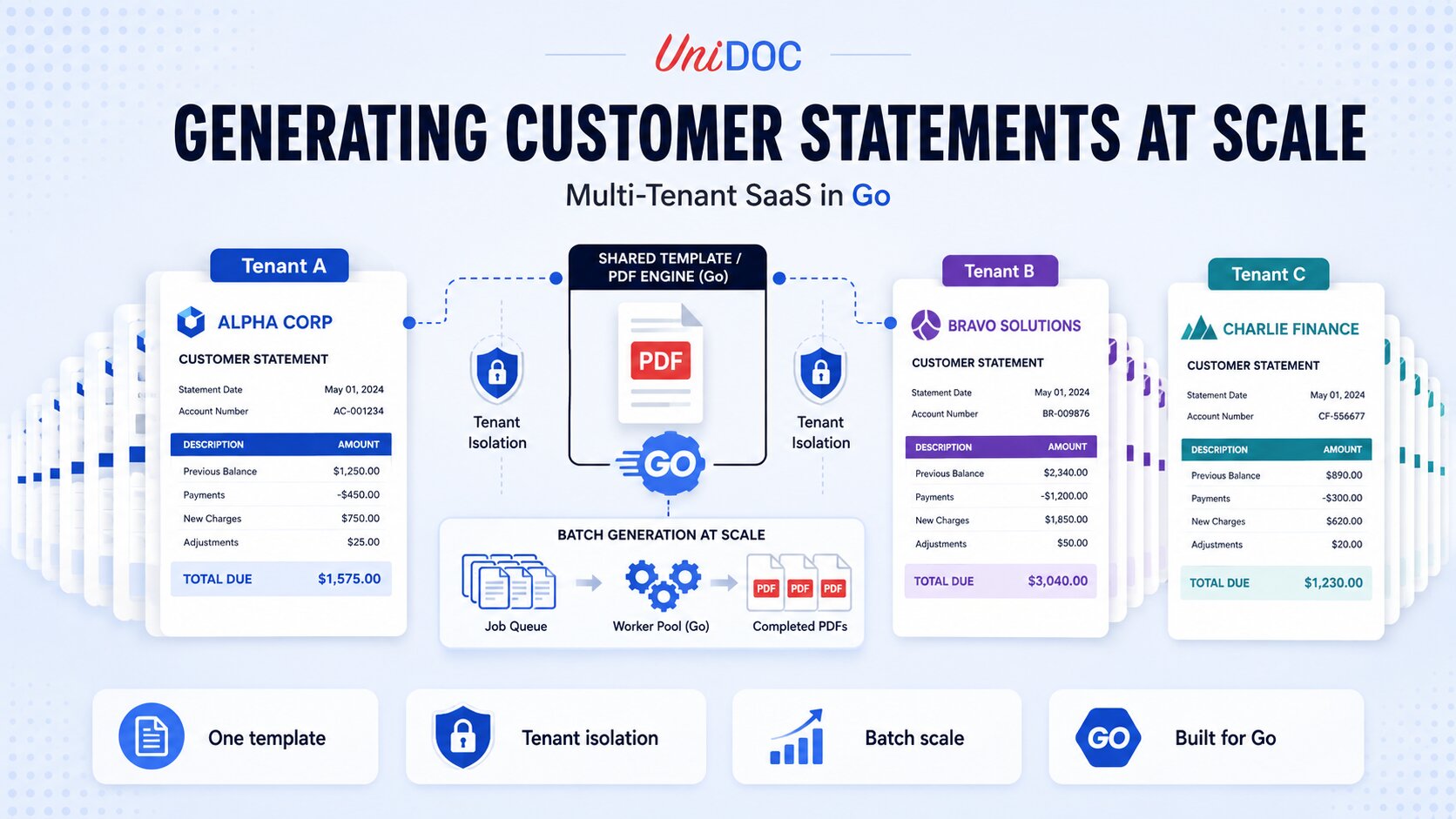
Generating Customer Statements at Scale in Multi-Tenant SaaS



Customer statements are not a formatting problem. They are a revenue and compliance surface. In a multi-tenant SaaS platform, a statement run is the moment your product touches every one of your customers' customers at once, with numbers that have to be correct, branding that has to be theirs, and delivery that cannot slip past a billing or regulatory deadline. When that run fails halfway through, or renders one tenant’s logo on another tenant’s statement, the cost is not a bug ticket. It is a support escalation, a compliance question, and a dent in the trust your platform is built on.
This guide covers how to generate customer statements programmatically in Go across many tenants: reliably, with consistent per-tenant branding, and at the volume a production statement run demands, using UniPDF.
Why Statement Generation Is Hard in a Multi-Tenant Platform
Generating a single PDF from known data is straightforward. The difficulty in a SaaS platform comes from three constraints that apply at once:
- Per-tenant consistency. Every tenant expects their own logo, colors, legal footer, and address block, while the underlying statement logic stays identical for all of them. You cannot maintain a separate code path per tenant, and you cannot let one tenant’s configuration bleed into another tenant’s output.
- Volume and batch pressure. Statement runs are bursty. A platform with thousands of tenants may generate tens or hundreds of thousands of statements in a narrow month-end or billing-cycle window. That is a concurrency and resource-management problem, not just a rendering one.
- Correctness under SLA. These documents are tied to money, and in regulated verticals to compliance obligations. A statement that is late, wrong, or misattributed is a business incident. The pipeline has to fail cleanly and recoverably, not silently.
A library designed for one-off document creation on a desktop will not carry this load. What you need is a document engine that separates layout from data, runs natively inside your Go service, and behaves predictably under concurrent batch work.
The Core Pattern: One Template, Every Tenant’s Data
The approach that scales in a multi-tenant platform is to define the statement layout once and inject each tenant’s data and branding into it at render time. UniPDF’s creator templates are built for this.
Templates use an XML-style markup that the creator package parses into rendered components at runtime. They run in two phases: first as a Go text/template, which lets you inject data and run logic, then as a component tree that is laid out and rendered into the PDF. The practical benefit is decoupling. The layout lives in a .tpl file, the data lives in your database, and per-tenant branding is just more data. Footer wording is one of those data fields, so changing it is a database update. If the footer’s layout has to change, you edit the template rather than rebuild and redeploy the service, as long as templates are loaded at runtime rather than embedded in the binary with go:embed.
That separation is what makes multi-tenancy tractable: one template, one code path, and each tenant’s data rendered through it in isolation. For a concrete, runnable starting point on the template markup itself, the bank account statement example builds a full multi-page statement you can adapt.
Step 1: Initialize the License
UniPDF requires a license key to operate. For development and most cloud deployments, the quickest start is a free metered API key from cloud.unidoc.io; metered keys report usage data over the network. For regulated or air-gapped environments where statement data cannot leave the boundary, use an offline (perpetual) key instead. It validates locally with no outbound network calls, which is the model a security review expects when tenant financial data is in scope. Offline keys are available through unidoc.io/pricing.
// license.go
package main

import (
    "os"

    "github.com/unidoc/unipdf/v5/common/license"
)

func init() {
    // Metered key (cloud and development): reports usage data over the network.
    if err := license.SetMeteredKey(os.Getenv("UNIDOC_LICENSE_API_KEY")); err != nil {
        panic(err)
    }

    // For air-gapped or regulated tenants, load a signed offline key instead.
    // It validates locally with no network calls:
    //   key, err := os.ReadFile("unidoc.lic")
    //   if err != nil {
    //       panic(err)
    //   }
    //   if err := license.SetLicenseKey(string(key), "Your Company Name"); err != nil {
    //       panic(err)
    //   }
}
Step 2: Model the Statement Data, Including Branding
Because branding is data, each tenant’s configuration and the statement content travel together into the template. Modeling this explicitly keeps tenant isolation clean: every render receives exactly one tenant’s data and nothing else. Three modeling choices matter here. First, carry an explicit TenantID, because account numbers are unique only within a tenant, not across them. Second, hold money as integer minor units rather than float64; floating point will not tie back to the ledger, and this is a document whose whole purpose is that the numbers are exact. Third, validate the branding fields that end up inside template attributes rather than template text, because those are the ones that can break the markup or reach a file the tenant does not own.
// model.go
package main

import (
    "fmt"
    "path"
    "path/filepath"
    "regexp"
    "strings"
)

type Branding struct {
    TenantName   string
    LogoPath     string // relative to the tenant asset root
    PrimaryColor string // e.g. "#0B5FFF"
    FooterText   string
    Address      string
}

var (
    hexColor  = regexp.MustCompile(`^#[0-9A-Fa-f]{6}$`)
    safeAsset = regexp.MustCompile(`^[A-Za-z0-9._/-]+$`)
)

// Normalize checks the two branding fields that land in template attributes
// rather than in template text. The xml helper in render.go escapes text; an
// attribute still has to be validated, because a stray quote breaks the markup
// and a "../.." in a logo path reads a file the tenant does not own.
func (b *Branding) Normalize(assetRoot string) error {
    if !hexColor.MatchString(b.PrimaryColor) {
        return fmt.Errorf("tenant %q: invalid primary color %q", b.TenantName, b.PrimaryColor)
    }
    if !safeAsset.MatchString(b.LogoPath) {
        return fmt.Errorf("tenant %q: invalid logo path %q", b.TenantName, b.LogoPath)
    }
    root := filepath.Clean(assetRoot)
    full := filepath.Join(root, filepath.FromSlash(path.Clean("/"+b.LogoPath)))
    if !strings.HasPrefix(full, root+string(filepath.Separator)) {
        return fmt.Errorf("tenant %q: logo path %q escapes the asset root", b.TenantName, b.LogoPath)
    }
    b.LogoPath = full
    return nil
}

type Transaction struct {
    Date        string
    Description string
    AmountMinor int64 // minor units (e.g. cents); integer money avoids float rounding
}

// Amount formats the transaction's minor units for display, without floats.
func (t Transaction) Amount() string {
    m, sign := t.AmountMinor, ""
    if m < 0 {
        m, sign = -m, "-"
    }
    return fmt.Sprintf("%s%d.%02d", sign, m/100, m%100)
}

type Statement struct {
    TenantID      string // unique per tenant; part of the output key
    Branding      Branding
    AccountHolder string
    AccountNumber string // unique only within a tenant
    PeriodStart   string
    PeriodEnd     string
    OpeningMinor  int64
    ClosingMinor  int64
    Transactions  []Transaction
}
Call Normalize once per tenant where you load branding, not inside the render loop — it is a configuration check, and a tenant whose branding is malformed should fail the batch’s setup rather than thousands of individual statements.
Your statement template (statement.tpl) references these fields directly. The markup is an XML-style tag language, and each tenant’s data is injected through standard text/template actions. That last detail carries a sharp edge: text/template inserts values verbatim, with no escaping. A description as ordinary as Fees & adjustments therefore emits markup the parser rejects, and a value containing < or > silently reshapes the component tree. Every tenant- or customer-supplied string has to go through an escaping helper — xml below, registered in Step 3 — before it reaches the template.
A minimal excerpt showing the logo, the tenant name in the tenant’s brand color, and a right-aligned amount column:
<division>
    <image src="path('{{.Branding.LogoPath}}')" fit-mode="fill-width" margin="0 0 10 0"></image>
    <paragraph margin="0 0 10 0">
        <text-chunk font="helvetica-bold" font-size="14" color="{{.Branding.PrimaryColor}}">{{xml .Branding.TenantName}}</text-chunk>
    </paragraph>
</division>

<table columns="3" column-widths="0.2 0.6 0.2" margin="10 0 0 0">
    {{range .Transactions}}
    <table-cell indent="0">
        <paragraph><text-chunk>{{xml .Date}}</text-chunk></paragraph>
    </table-cell>
    <table-cell indent="0">
        <paragraph><text-chunk>{{xml .Description}}</text-chunk></paragraph>
    </table-cell>
    <table-cell indent="0">
        <paragraph text-align="right"><text-chunk>{{.Amount}}</text-chunk></paragraph>
    </table-cell>
    {{end}}
</table>
Note which values are not wrapped in xml. {{.Amount}} is generated by the Amount method above, so it only ever contains digits, a dot, and a minus sign. LogoPath and PrimaryColor sit inside attributes, where escaping is the wrong tool — a path('…') argument or a color needs to be rejected outright if it is malformed, which is exactly what Branding.Normalize did before the render started.
Amounts are right-aligned with text-align on the <paragraph>, since a paragraph fills its cell and cell-level align only shifts a narrower drawable. The same fields drive every tenant’s output, so a branding change is a data change, never a code change. Swapping {{.Branding.LogoPath}} and {{.Branding.PrimaryColor}} for another tenant’s values is the entire per-tenant customization.
Step 3: Render One Tenant’s Statement
Load the template into memory once, then render each statement from a fresh reader over those bytes. This detail matters: DrawTemplate consumes the io.Reader it is given, so reusing a single reader across renders produces a correct first PDF and a blank document for every statement after it, with no error raised. Reading into a []byte and wrapping it per render avoids both that trap and a file open on every one of a hundred thousand statements.
This is also where the xml helper the template depends on gets registered, through TemplateOptions.HelperFuncMap.
// render.go
package main

import (
    "bytes"
    "encoding/xml"
    "fmt"
    "os"
    "path/filepath"
    "strings"
    "text/template"

    "github.com/unidoc/unipdf/v5/creator"
)

// loadTemplate reads the template once. Reuse the returned bytes across renders,
// but never share a single io.Reader: DrawTemplate consumes it.
func loadTemplate(path string) ([]byte, error) {
    return os.ReadFile(path)
}

// xmlEscape makes an arbitrary string safe to interpolate into the template.
// text/template does no escaping of its own, so a description as ordinary as
// "Fees & adjustments" would otherwise emit markup the parser rejects.
func xmlEscape(s string) string {
    var b strings.Builder
    if err := xml.EscapeText(&b, []byte(s)); err != nil {
        return ""
    }
    return b.String()
}

// templateOptions registers the escaping helper for every render. Add your own
// helpers here too, alongside DrawHeader/DrawFooter for running elements.
var templateOptions = &creator.TemplateOptions{
    HelperFuncMap: template.FuncMap{"xml": xmlEscape},
}

func renderStatement(tplBytes []byte, s Statement, outputPath string) error {
    c := creator.New()
    c.SetPageMargins(40, 40, 60, 60)

    // A fresh reader per render, and the shared options carrying the xml helper.
    if err := c.DrawTemplate(bytes.NewReader(tplBytes), s, templateOptions); err != nil {
        return fmt.Errorf("draw template for tenant %q account %q: %w", s.TenantID, s.AccountNumber, err)
    }

    // Write to a unique temp file in the destination directory and rename on
    // success. Unique, not outputPath+".tmp": two workers rendering the same key
    // would otherwise share one scratch path and publish each other's bytes.
    dir, base := filepath.Split(outputPath)
    if dir == "" {
        dir = "."
    }
    tmp, err := os.CreateTemp(dir, base+".*.tmp")
    if err != nil {
        return fmt.Errorf("create temp file for tenant %q account %q: %w", s.TenantID, s.AccountNumber, err)
    }
    tmpPath := tmp.Name()
    tmp.Close()
    defer os.Remove(tmpPath) // no-op once the rename below succeeds

    if err := c.WriteToFile(tmpPath); err != nil {
        return fmt.Errorf("write statement for tenant %q account %q: %w", s.TenantID, s.AccountNumber, err)
    }
    if err := os.Rename(tmpPath, outputPath); err != nil {
        return fmt.Errorf("publish statement for tenant %q account %q: %w", s.TenantID, s.AccountNumber, err)
    }
    return nil
}
The same renderStatement function serves every tenant. The only thing that changes between calls is the Statement value passed in. That property is what lets you scale the run horizontally without branching logic per tenant. Note that the bank-account-statement template this article links to goes further than this minimal call: it registers several helper functions of its own through TemplateOptions.HelperFuncMap and draws repeating headers and footers with DrawHeader and DrawFooter, so extend templateOptions and add those calls when you adapt it.
Step 4: Run the Batch With a Bounded Worker Pool
A statement run means calling renderStatement many thousands of times. Doing that serially wastes the machine. Doing it with unbounded goroutines invites resource exhaustion, because each concurrent render holds a full document in memory, so peak live heap grows with the number of workers multiplied by the size of one statement. Statement size is set by your data; the worker count is the factor you control, which is exactly why bounding the pool is the lever. The right model is a bounded worker pool sized to your cores and memory budget, keyed so that no two statements can collide on disk.
// batch.go
package main

import (
    "context"
    "crypto/sha256"
    "encoding/hex"
    "fmt"
    "log"
    "path/filepath"
    "strings"
    "sync"
)

type FailedStatement struct {
    TenantID      string
    AccountNumber string
    Err           error
}

// statementFileName builds a collision-resistant output name. All four
// identifying fields are hashed length-prefixed, so no two distinct statements
// can produce the same key no matter what separators the values contain. The
// readable prefix is for operators browsing the directory; the digest is what
// guarantees uniqueness.
func statementFileName(s Statement) string {
    h := sha256.New()
    for _, f := range []string{s.TenantID, s.AccountNumber, s.PeriodStart, s.PeriodEnd} {
        fmt.Fprintf(h, "%d:%s", len(f), f)
    }
    digest := hex.EncodeToString(h.Sum(nil))[:16]
    return fmt.Sprintf("%s-%s-%s.pdf", label(s.TenantID), label(s.PeriodEnd), digest)
}

// label reduces a field to a short filename-safe fragment. It is lossy on
// purpose: readability only, with the digest carrying uniqueness.
func label(v string) string {
    v = strings.Map(func(r rune) rune {
        switch {
        case r >= 'a' && r <= 'z', r >= 'A' && r <= 'Z', r >= '0' && r <= '9':
            return r
        default:
            return '-'
        }
    }, v)
    if len(v) > 24 {
        v = v[:24]
    }
    return v
}

func runStatementBatch(ctx context.Context, statements []Statement, tplBytes []byte, outDir string, workers int) ([]FailedStatement, error) {
    if workers < 1 {
        workers = 1 // a zero or negative pool starts no consumers and deadlocks on the first send
    }

    jobs := make(chan Statement)
    var (
        wg     sync.WaitGroup
        mu     sync.Mutex
        failed []FailedStatement
    )

    for i := 0; i < workers; i++ {
        wg.Add(1)
        go func() {
            defer wg.Done()
            for s := range jobs {
                out := filepath.Join(outDir, statementFileName(s))
                if err := renderStatement(tplBytes, s, out); err != nil {
                    // Do not fail the whole run. Record this one and keep going.
                    log.Printf("statement failed: tenant=%s account=%s: %v",
                        s.TenantID, s.AccountNumber, err)
                    mu.Lock()
                    failed = append(failed, FailedStatement{s.TenantID, s.AccountNumber, err})
                    mu.Unlock()
                }
            }
        }()
    }

    var (
        undispatched []Statement
        runErr       error
    )
loop:
    for i, s := range statements {
        select {
        case <-ctx.Done(): // caller canceled or deadline hit
            runErr, undispatched = ctx.Err(), statements[i:]
            break loop
        case jobs <- s:
        }
    }
    close(jobs)
    wg.Wait()

    // Account for everything that never reached a worker. Dropping these
    // silently is what lets a canceled run be mistaken for a complete one.
    for _, s := range undispatched {
        failed = append(failed, FailedStatement{s.TenantID, s.AccountNumber, runErr})
    }
    return failed, runErr
}
A single failing tenant should never take down the run. The batch records each failure with enough context to reprocess and returns the list, so the caller knows exactly whether zero or five thousand statements failed and can drive a small, targeted retry rather than a full regeneration.
Passing a context.Context lets an operator cancel a run cleanly mid-flight, and the return signature is what makes that safe to act on. A canceled dispatch loop leaves statements that never reached a worker, and those are not failures in the same sense as a bad render — but they are not successes either. Returning them in failed alongside a non-nil ctx.Err() means no caller can mistake a run that stopped at statement 900 of 5,000 for one that finished. Check the error first to learn why the run ended, then work the slice to learn what is outstanding.
If your statements are image-heavy or your workers run in tightly memory-capped containers, tuning Go’s soft memory ceiling with GOMEMLIMIT makes the garbage collector more aggressive as usage approaches the limit, which reduces premature OOM kills. It governs heap-managed memory rather than the container’s total resident memory, so it complements a bounded worker pool rather than replacing it. That is a topic in its own right, covered in our guide to UniPDF with GOMEMLIMIT on memory-intensive applications.
Reliability and Tenant Isolation in Production
Beyond throughput, a statement pipeline in a multi-tenant platform has to be defensible:
- Isolate tenant data per render. Each
renderStatementcall receives one tenant’sStatementand a freshcreator.New(). There is no shared mutable document state across tenants, which is what prevents cross-tenant bleed in the output. - Make runs idempotent. Derive each output name from a hash of tenant, account, and both period bounds, so no two distinct statements can collide and re-running a failed batch overwrites cleanly. Because
renderStatementwrites to a unique temp file and renames on success, one tenant plus one account plus one period always maps to exactly one complete statement, never a truncated one and never bytes from a concurrent render of the same key. - Escape tenant text, validate tenant attributes. Statement data is user data. Route every tenant- and customer-supplied string through the
xmlhelper before it reaches the template, and reject malformed colors and logo paths up front withBranding.Normalize. Skipping either turns a customer with an ampersand in their name into a failed render. - Quarantine, do not crash. The batch routes each unrenderable statement into the returned failure list with full context (tenant, account, error) instead of aborting, and reports undispatched work the same way when a run is canceled. Patterns in those failures usually point at one upstream data source rather than a rendering defect.
- Deploy without a sidecar. The core UniPDF library is pure Go and builds with
CGO_ENABLED=0, so for the template-based generation used here a worker is just your Go process compiled into a single binary, with no separate document service and no cgo dependency in the deployment path. (UniDoc’s HTML-to-PDF component, UniHTML, does run its own server, but it is not part of this pipeline.) That keeps the dependency footprint small when workers scale out and when a security team reviews what is running.
Frequently Asked Questions
How do you generate customer statements in Go?
Define the statement layout once as a UniPDF creator template, then inject each customer’s data at render time with DrawTemplate and write the file with WriteToFile. The same function serves every customer; only the data passed in changes, which is what lets one code path produce every statement.
How do you keep per-tenant branding consistent across statements?
Treat branding as data. Each tenant’s logo path, colors, and footer travel in the same struct as the statement content, so a single template renders every tenant’s statement correctly without a separate code path per tenant. A branding change becomes a data change rather than a code change.
How do you generate PDFs at high volume in Go without running out of memory?
Drive the run through a bounded worker pool sized to your cores and memory budget rather than launching unbounded goroutines, since peak live heap grows with the number of concurrent renders. Setting a soft memory ceiling with GOMEMLIMIT makes the garbage collector more aggressive as usage approaches the limit, which reduces premature OOM kills; it governs heap memory rather than total container memory, so it complements the bounded pool.
Is UniPDF pure Go, and does it need a separate service?
The core UniPDF library is pure Go and builds with CGO_ENABLED=0, so it compiles into your service binary with no sidecar and no cgo dependency in the deployment path. UniHTML, the separate HTML-to-PDF component, does run its own server, but it is not needed for template-based statement generation.
Can UniPDF run offline for regulated or air-gapped tenants?
Yes. Load a signed offline key with license.SetLicenseKey, which validates locally using RSA-SHA512 with no outbound network calls. This differs from a metered key, loaded with license.SetMeteredKey, which reports usage data over the network.
Further Reading
If you are building broader document workflows in Go beyond statements, these resources cover related UniPDF capabilities:
- Creator Templates examples for the full set of template-based documents, including statements, receipts, and trade confirmations
- Applying Digital Signature to Your PDF for certifying statement output, useful in regulated distribution
- UniPDF API Reference for the full method signatures used in this article
- UniPDF Getting Started Guide if you are setting up UniPDF for the first time
- UniPDF GitHub examples repository for runnable Go code across all major use cases
Conclusion
Generating customer statements at scale is a platform problem, not a rendering trick. The approach that holds up in production is to define the statement layout once as a template, inject each tenant’s data and branding at render time, and drive the batch through a bounded worker pool that respects a memory budget. That gives you per-tenant consistency, tenant isolation by construction, predictable behavior under load, and clean failure handling when one tenant’s data is bad.
UniPDF gives Go teams a document engine to do this natively. The core library is pure Go, builds with CGO_ENABLED=0, and compiles into your Go binary, so there is no separate service to deploy and no cgo dependency in the path for template-based generation. It runs wherever your service does, and supports the offline, local-execution licensing model that enterprise and regulated tenants require. For a multi-tenant SaaS platform where a statement run touches every customer you have, that reliability is not a convenience feature. It is a platform requirement.
Start building your statement pipeline with UniPDF. Request a free trial or explore the docs.