How to Convert Office Book Archives to PDF in Go



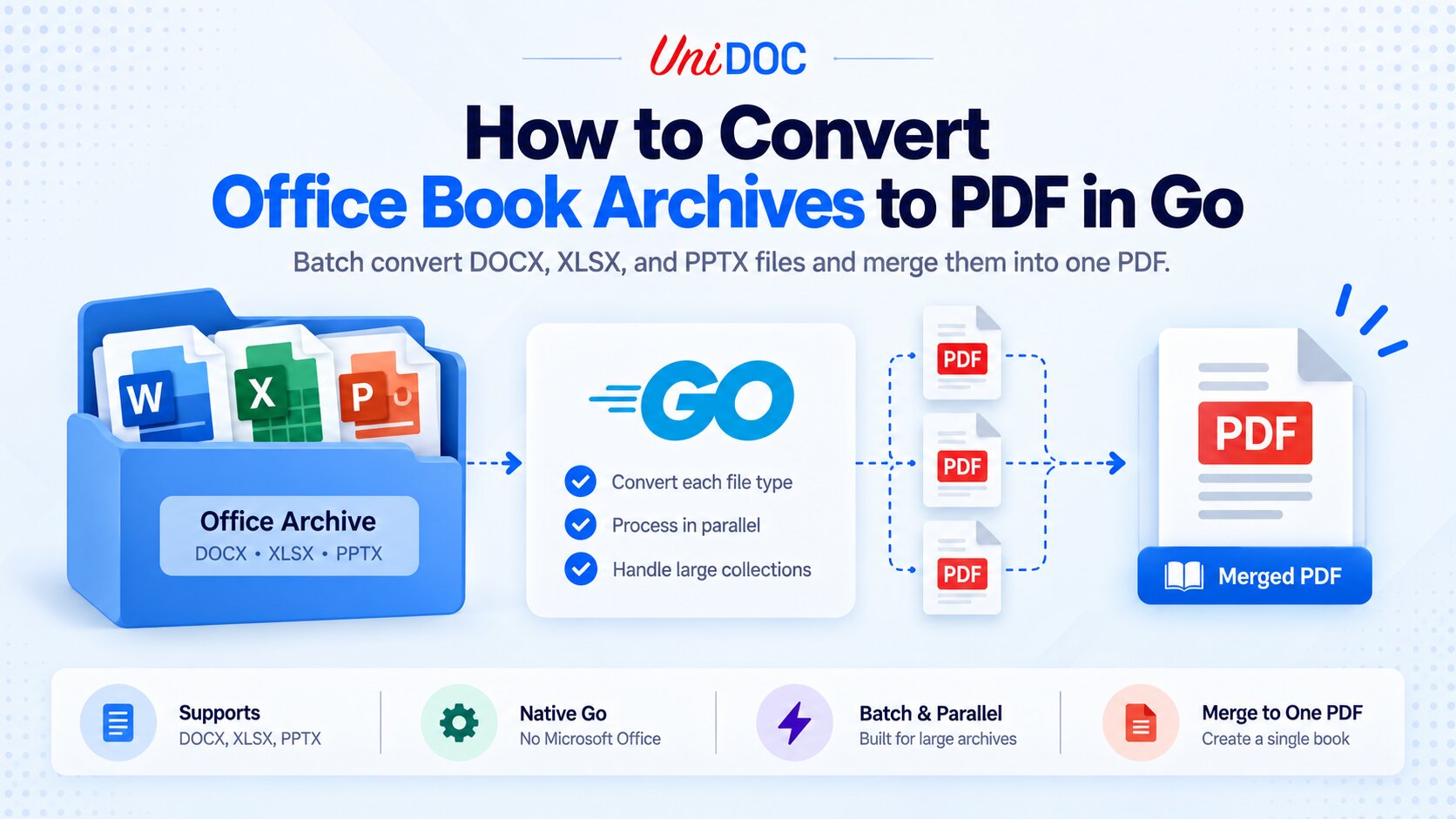
To convert a whole archive of Office documents to PDF in Go, walk the collection, convert each file by its type with UniOffice (DOCX, XLSX, and PPTX are each handled by their own converter), and, if you want a single bound “book,” merge the results with UniPDF. It runs natively in Go, with no Microsoft Office and no conversion server, so a batch of thousands of documents is just a Go program.
Converting one document is easy. Converting a collection of them, a folder or an archive of mixed Word, Excel, and PowerPoint files, into clean PDFs (or one combined PDF) is where the real work is: finding the files, routing each to the right converter, giving each output a collision-free name, doing it fast enough to matter, handling the ones that fail, and assembling the result in a predictable order. This guide builds that pipeline end to end. If you only need the single-file basics, start with How to Convert Word and Excel to PDF in Go; this piece picks up where that leaves off and takes it to a full archive.
Supported Formats: DOCX, XLSX, and PPTX
UniOffice converts the three modern Office Open XML formats natively in Go: .docx (Word), .xlsx (Excel), and .pptx (PowerPoint). It does not handle the legacy binary formats .doc, .xls, or .ppt; those need a separate upstream step (a LibreOffice or Office batch job) to save them as the modern format first.
Each format has its own converter package, and one behaves differently from the other two:
- Word and PowerPoint each convert to a single PDF.
- Excel converts per sheet: the spreadsheet converter takes a single sheet (a
Sheetpointer), so one.xlsxyields one PDF per sheet.
The pipeline below accounts for that: a single file can produce one or several PDFs, and the archive stage collects them all.
The conversion is pure Go, rendered through UniPDF in-process, so there is no Microsoft Office, no LibreOffice, and no browser to install or run. That is what makes converting a large archive practical on a build server or in a container.
Step 1: Install and License
Prerequisites: Go 1.25 or newer. The current releases the go get commands below pull, UniOffice v2.14.0 and UniPDF v5.1.0, require Go 1.25. On Go 1.24 the toolchain will fetch 1.25 automatically, unless GOTOOLCHAIN=local (common in CI and air-gapped builds) blocks that and the build fails, so install Go 1.25 first in those environments. To stay on Go 1.24 instead, pin the last 1.24-compatible releases: go get github.com/unidoc/unioffice/[email protected] and go get github.com/unidoc/unipdf/[email protected].
Create a module and add both libraries; conversion uses UniOffice for the Office side and UniPDF for rendering and merging.
go mod init example.com/office-archive

go get github.com/unidoc/unioffice/v2
go get github.com/unidoc/unipdf/v5

go mod tidy
Both libraries need a license key, and a single free metered key from cloud.unidoc.io sets both (it reports usage over the network, so it needs outbound access and consumes credits per conversion). Load them once at startup.
// license.go
package main

import (
    "os"

    uolicense "github.com/unidoc/unioffice/v2/common/license"
    uplicense "github.com/unidoc/unipdf/v5/common/license"
)

func init() {
    key := os.Getenv("UNIDOC_LICENSE_API_KEY")
    if err := uolicense.SetMeteredKey(key); err != nil {
        panic(err)
    }
    if err := uplicense.SetMeteredKey(key); err != nil {
        panic(err)
    }
}
For regulated or air-gapped batch jobs, use a signed offline key instead: call SetLicenseKey(contents, "Your Company Name") on both the UniOffice and UniPDF license packages, with the company name matching the name embedded in the signed key. It validates locally with no network calls.
Step 2: Convert One Document of Any Type
The unit of work is a function that takes any supported file and returns the PDF paths it produced. Two things matter here. First, because the three formats live in three packages that are all named convert, import them under aliases. Second, give every output a unique name. Real archives have duplicate base names (a/report.docx and b/report.docx), so a base-name-only scheme would silently overwrite one output with another, and when two workers write the same path one document disappears from the book while another appears twice.
Flattening the relative path into the name is not enough: a__b/c.docx and a/b__c.docx both flatten to the same string, Q1 report.docx and Q1_report.docx collide once spaces become underscores, and a deep archive can push the name past the 255-byte filename limit. Prefixing each output with the file’s index in the sorted list avoids all three. The index is unique by construction, short, and preserves the sort order, and the base name rides along (trimmed) so the output is still readable.
// convert.go
package main

import (
    "fmt"
    "os"
    "path/filepath"
    "strings"

    "github.com/unidoc/unioffice/v2/document"
    docconvert "github.com/unidoc/unioffice/v2/document/convert"
    "github.com/unidoc/unioffice/v2/presentation"
    pptconvert "github.com/unidoc/unioffice/v2/presentation/convert"
    "github.com/unidoc/unioffice/v2/spreadsheet"
    xlsxconvert "github.com/unidoc/unioffice/v2/spreadsheet/convert"
)

// maxNamePart caps each piece of a generated name so the whole filename stays
// well under the 255-byte limit most filesystems enforce.
const maxNamePart = 100

// outName builds a unique base name for one input: its index in the sorted file
// list, plus a trimmed base name so the output is still readable. The index is
// what makes it unique, whatever the source names look like.
func outName(index int, path string) string {
    return fmt.Sprintf("%05d_%s", index, safeName(filepath.Base(path)))
}

// convertFile converts the file at index in the sorted archive listing to one or
// more PDFs in outDir and returns the paths it wrote. A .docx or .pptx yields one
// PDF; a .xlsx yields one per visible sheet.
func convertFile(index int, path, outDir string) ([]string, error) {
    stem := outName(index, path) // unique, and keeps the source extension

    switch strings.ToLower(filepath.Ext(path)) {
    case ".docx":
        doc, err := document.Open(path)
        if err != nil {
            return nil, fmt.Errorf("open %q: %w", path, err)
        }
        defer doc.Close()
        out := filepath.Join(outDir, stem+".pdf")
        if err := docconvert.ConvertToPdf(doc).WriteToFile(out); err != nil {
            os.Remove(out) // WriteToFile creates the file before it renders
            return nil, fmt.Errorf("convert %q: %w", path, err)
        }
        return []string{out}, nil

    case ".pptx":
        ppt, err := presentation.Open(path)
        if err != nil {
            return nil, fmt.Errorf("open %q: %w", path, err)
        }
        defer ppt.Close()
        out := filepath.Join(outDir, stem+".pdf")
        if err := pptconvert.ConvertToPdf(ppt).WriteToFile(out); err != nil {
            os.Remove(out)
            return nil, fmt.Errorf("convert %q: %w", path, err)
        }
        return []string{out}, nil

    case ".xlsx":
        wb, err := spreadsheet.Open(path)
        if err != nil {
            return nil, fmt.Errorf("open %q: %w", path, err)
        }
        defer wb.Close()
        var outs []string
        for i, s := range wb.Sheets() {
            out := filepath.Join(outDir, fmt.Sprintf("%s_%02d_%s.pdf", stem, i, safeName(s.Name())))
            c := xlsxconvert.ConvertToPdf(&s)
            if c == nil {
                // A sheet with no underlying data converts to a nil *Creator.
                // WriteToFile would create the output file and only then panic,
                // so check here and fail cleanly instead.
                removeAll(outs)
                return nil, fmt.Errorf("convert %q sheet %q: no sheet data", path, s.Name())
            }
            if err := c.WriteToFile(out); err != nil {
                // Remove this sheet's partial file and the sheets already
                // written for this workbook, so no orphans are left behind.
                os.Remove(out)
                removeAll(outs)
                return nil, fmt.Errorf("convert %q sheet %q: %w", path, s.Name(), err)
            }
            outs = append(outs, out)
        }
        if len(outs) == 0 {
            // Sheets() skips hidden sheets, so a workbook can yield nothing.
            return nil, fmt.Errorf("%q has no visible worksheets", path)
        }
        return outs, nil

    default:
        return nil, fmt.Errorf("unsupported format %q (only .docx, .xlsx, .pptx)", filepath.Ext(path))
    }
}

// removeAll deletes PDFs already written for a workbook whose conversion failed
// partway, so a failed file leaves nothing behind.
func removeAll(paths []string) {
    for _, p := range paths {
        os.Remove(p)
    }
}

// safeName turns a path or sheet name into a filename-safe string, trimmed to
// maxNamePart bytes.
func safeName(name string) string {
    name = strings.Map(func(r rune) rune {
        switch r {
        case '/', '\\', ':', '*', '?', '"', '<', '>', '|', ' ':
            return '_'
        }
        return r
    }, name)
    if len(name) > maxNamePart {
        // ToValidUTF8 drops a multi-byte rune the cut may have split.
        name = strings.ToValidUTF8(name[:maxNamePart], "")
    }
    return name
}
This is the only place that touches the UniOffice converters. Everything else in the pipeline is orchestration around it.
Step 3: Find Every Document in the Archive
An “archive” here is a directory of files. If yours arrives as a .zip, extract it to a temp directory first, then point the walker at that directory. Validate the entry names while you extract: an untrusted archive can carry a path like ../../etc/cron.d/x and write outside the destination, the “zip slip” bug. On Go 1.23 and newer os.CopyFS(dest, zipReader) rejects unsafe paths for you; with a hand-rolled loop, check that each filepath.Join(dest, f.Name) still has dest as its prefix, or set GODEBUG=zipinsecurepath=0 so zip.Reader returns ErrInsecurePath.
Walk the extracted directory once, keep only the supported formats, and sort the result so the eventual merged output is deterministic. Three real-world details: log and skip entries you cannot read (a permission-denied subdirectory) instead of aborting the whole walk, fail fast if the root itself is missing or unreadable, and ignore Office lock files like ~$report.docx.
// archive.go
package main

import (
    "io/fs"
    "log"
    "path/filepath"
    "sort"
    "strings"
)

// collectOfficeFiles walks root and returns the .docx, .xlsx, and .pptx files,
// sorted. It logs and skips unreadable entries inside the tree instead of
// aborting, fails fast if root itself cannot be read, and ignores Office lock
// files (~$...).
func collectOfficeFiles(root string) ([]string, error) {
    var files []string
    err := filepath.WalkDir(root, func(path string, d fs.DirEntry, err error) error {
        if err != nil {
            if path == root {
                return err // missing or unreadable root: fail, don't return zero files
            }
            log.Printf("skip %q: %v", path, err) // unreadable entry; keep walking
            return nil
        }
        if d.IsDir() {
            return nil
        }
        name := d.Name()
        if strings.HasPrefix(name, "~$") {
            return nil // Office lock file
        }
        switch strings.ToLower(filepath.Ext(name)) {
        case ".docx", ".xlsx", ".pptx":
            files = append(files, path)
        }
        return nil
    })
    if err != nil {
        return nil, err
    }
    sort.Strings(files) // deterministic order, so a merged book is reproducible
    return files, nil
}
The path == root check is what separates a bad run from an empty one. Without it the callback swallows every error, so a mistyped root like archvie logs one “skip”, finds zero files, and surfaces much later as a confusing merge: no PDFs to merge.
Step 4: Convert the Whole Archive Concurrently
Conversion is CPU-bound and independent per file, so a bounded worker pool is the right model: fast, but capped so a large archive does not exhaust memory. Guard the worker count so a zero or negative value cannot deadlock the program, collect the outputs keyed by input, and quarantine failures instead of aborting the run, so one corrupt file does not stop the batch. Rebuilding the output order from the sorted input list keeps a later merge reproducible.
Quarantining means catching panics too, not just errors. A malformed document can panic inside a converter, and a panic in any goroutine takes down the whole process: no failure list, no book. The safeConvert wrapper below turns a panic into an ordinary failure, which is what the rest of the pipeline already knows how to handle.
recover is the backstop, not the first line of defence. Where a panic is predictable, check for it instead, because recover runs after the damage is done: Creator.WriteToFile calls os.Create before it renders, so a panic inside the render leaves an empty PDF on disk that nothing cleans up. That is why the convertFile above tests the spreadsheet converter’s return value for nil before calling WriteToFile on it, turning the one documented panic into a plain error and leaving recover to handle the ones nobody has catalogued yet.
// batch.go
package main

import (
    "fmt"
    "log"
    "runtime"
    "sync"
)

type job struct {
    index int
    path  string
}

type result struct {
    input   string
    outputs []string
    err     error
}

// safeConvert turns a panic inside a converter into an ordinary error, so one
// malformed document cannot take the whole batch down with it.
func safeConvert(index int, path, outDir string) (outs []string, err error) {
    defer func() {
        if r := recover(); r != nil {
            err = fmt.Errorf("panic converting %q: %v", path, r)
        }
    }()
    return convertFile(index, path, outDir)
}

// convertArchive converts every Office file under root to PDF using a bounded
// worker pool, and returns the output PDFs in input order plus any failures.
func convertArchive(root, outDir string, workers int) (ordered []string, failed []result, err error) {
    if workers < 1 {
        workers = runtime.NumCPU()
    }

    files, err := collectOfficeFiles(root)
    if err != nil {
        return nil, nil, fmt.Errorf("walk %q: %w", root, err)
    }

    jobs := make(chan job)
    results := make(chan result)

    var wg sync.WaitGroup
    for i := 0; i < workers; i++ {
        wg.Add(1)
        go func() {
            defer wg.Done()
            for j := range jobs {
                outs, err := safeConvert(j.index, j.path, outDir)
                results <- result{input: j.path, outputs: outs, err: err}
            }
        }()
    }

    go func() {
        for i, f := range files {
            jobs <- job{index: i, path: f}
        }
        close(jobs)
        wg.Wait()
        close(results)
    }()

    byInput := make(map[string][]string)
    for r := range results {
        if r.err != nil {
            log.Printf("convert failed: %s: %v", r.input, r.err)
            failed = append(failed, r)
            continue
        }
        byInput[r.input] = r.outputs
    }

    for _, f := range files {
        ordered = append(ordered, byInput[f]...)
    }
    return ordered, failed, nil
}
Size workers to your cores and memory: each one holds a document in memory while it renders (see the memory note under Production Notes).
One constraint on the concurrency: converter settings are process-global, not per call. document/convert.ConvertToPdf writes a package-level default font size on every call, and ConvertToPdfWithOptions also sets the image encoder globally. Passing nil options, as here, is safe because every worker writes the same value, but do not vary converter Options across concurrent workers: the settings would leak between documents, and go test -race over this pipeline can report races inside the library.
Step 5: Merge the Archive Into One Book
If the goal is a single bound PDF, an entire collection rendered into one file, merge the converted PDFs in order. UniPDF’s pdfutil.MergePdf takes the input paths and writes one output.
Mind the scale, though. MergePdf opens every input and keeps it open until the merge finishes, so a one-shot call over a whole archive can run into the per-process open-file limit and fail with too many open files. Since Go 1.19 a Go program raises its soft limit to the hard limit at startup, so the ceiling is the hard limit: generous on most hosts, but low in a locked-down container or under a strict ulimit -Hn. Every Excel sheet adds another input, so that ceiling arrives sooner than the file count suggests. Merging in bounded chunks and then merging the chunks keeps the number of open files flat no matter how large the archive is.
// merge.go
package main

import (
    "fmt"
    "os"
    "path/filepath"

    "github.com/unidoc/unipdf/v5/pdfutil"
)

// mergeBook combines the converted PDFs, in order, into a single bound PDF.
// MergePdf holds every input open until it finishes, so merge in chunks and
// then merge the chunks, keeping the number of open files bounded.
func mergeBook(pdfPaths []string, outputPath string) error {
    const chunkSize = 200

    if len(pdfPaths) == 0 {
        return fmt.Errorf("no PDFs to merge")
    }
    if len(pdfPaths) <= chunkSize {
        return pdfutil.MergePdf(pdfPaths, outputPath, false)
    }

    var parts []string
    defer func() {
        for _, p := range parts {
            os.Remove(p)
        }
    }()

    for i := 0; i < len(pdfPaths); i += chunkSize {
        f, err := os.CreateTemp(filepath.Dir(outputPath), "merge-part-*.pdf")
        if err != nil {
            return err
        }
        f.Close()
        parts = append(parts, f.Name()) // unique names, so a deeper recursion cannot clash
        if err := pdfutil.MergePdf(pdfPaths[i:min(i+chunkSize, len(pdfPaths))], f.Name(), false); err != nil {
            return err
        }
    }
    return mergeBook(parts, outputPath)
}
The pieces then compose into the whole pipeline. Create the output directory first, or every write fails on a fresh run.
// main.go
package main

import (
    "fmt"
    "log"
    "os"
    "strings"
)

func main() {
    const root, outDir = "archive", "out"
    if err := os.MkdirAll(outDir, 0o755); err != nil {
        log.Fatal(err)
    }

    ordered, failed, err := convertArchive(root, outDir, 8)
    if err != nil {
        log.Fatal(err)
    }

    // Write the failure list before merging. If every file failed, or the merge
    // itself fails, this is the run where that list matters most.
    if len(failed) > 0 {
        if err := writeFailures("failures.txt", failed); err != nil {
            log.Printf("write failures.txt: %v", err)
        }
    }

    if err := mergeBook(ordered, "book.pdf"); err != nil {
        log.Fatalf("merge: %v", err)
    }
    log.Printf("converted %d PDFs, %d failures", len(ordered), len(failed))

    if len(failed) > 0 {
        os.Exit(1) // an incomplete book is not a successful run
    }
}

// writeFailures records each failed input and its error, one per line, so the
// failures can be reprocessed as a small targeted set.
func writeFailures(path string, failed []result) error {
    var b strings.Builder
    for _, f := range failed {
        fmt.Fprintf(&b, "%s\t%v\n", f.input, f.err)
    }
    return os.WriteFile(path, []byte(b.String()), 0o644)
}
Walk the archive, convert every document across a worker pool, and bind the results into book.pdf. Failures go to failures.txt and the program exits non-zero, so a CI job or container run does not report success on an incomplete book, and you have the exact list of inputs to reprocess. Note the order: the list is written before the merge. If every file failed, ordered is empty and mergeBook returns “no PDFs to merge”, and that is precisely the run where you need the list, so it must not sit behind a step that can exit first. If you would rather keep the PDFs separate, skip the merge and use the per-file outputs directly.
Production Notes
- Pure Go, no external converter. No Microsoft Office, no LibreOffice, no headless browser. The whole pipeline compiles into one binary and cross-compiles like any Go program, which is what makes running it over a large archive in a container straightforward.
- Ship your fonts, in all three converters. UniOffice resolves typefaces from the host’s system fonts, but slim, distroless, and scratch container images have few or none, so text falls back to substitutes. Bundle the fonts your documents need into the image and register them, and note that
document/convert,presentation/convert, andspreadsheet/converteach have their ownRegisterFontsFromDirectory, so register with all three:
for _, register := range []func(string) error{
    docconvert.RegisterFontsFromDirectory,
    pptconvert.RegisterFontsFromDirectory,
    xlsxconvert.RegisterFontsFromDirectory,
} {
    if err := register("/usr/share/fonts/app"); err != nil {
        log.Fatal(err)
    }
}
- Air-gapped needs an offline key. The metered key reports usage over the network, so it will not work air-gapped; use an offline license key for those deployments.
- Modern formats only.
.docx,.xlsx,.pptx. Detect and convert legacy.doc/.xls/.pptwith a separate upstream step (LibreOffice or Office), or skip and report them. - Excel expands to multiple PDFs, one per visible sheet.
wb.Sheets()skips hidden and very-hidden sheets, which is usually what you want, but it means a workbook with no visible worksheets (a charts-only file, say) would otherwise produce nothing and land in neither the book nor the failure list;convertFilereports that as an error instead. If a sheet fails mid-workbook, its partial file and the sheets already written are removed, so no orphaned PDFs are left behind. - Check before you recover.
Creator.WriteToFilecreates the output file before it renders, so a panic inside the render leaves an empty PDF thatrecovercannot clean up. Test the spreadsheet converter’s return value for nil rather than relying on the recover to catch it, and keeprecoverfor the panics you have not catalogued. - Quarantine, do not abort. An unreadable file or directory is logged and skipped during the walk, and a failed conversion, including one that panics inside the converter, goes into the failure list; either way the batch continues. Write that list out before the merge, so a run where everything failed still produces it, and reprocess those files as a small targeted set.
- Order is a choice. The pipeline merges in sorted input order for reproducibility; sort the file list differently if the book needs a specific sequence.
- Watch memory on big runs. Each concurrent conversion holds a document in memory, so cap the worker count and set
GOMEMLIMITto keep peak usage under the container limit. The merge is separate:MergePdfbuilds the whole output in memory before writing it, so a very large single book is memory-bound however few workers you run. Chunking bounds the open files, not the size of the final document; if the book is too big to hold in memory, ship the per-file PDFs instead of binding them into one. - Do not vary converter options across workers. Converter settings are package-level globals, so per-document
Optionsleak between concurrent conversions. Keep one configuration for the whole run.
Frequently Asked Questions
How do you convert a folder of Office documents to PDF in Go?
Walk the folder with filepath.WalkDir, keep the .docx, .xlsx, and .pptx files, and convert each with UniOffice: the document, presentation, or spreadsheet package opens the file, and its matching convert package renders the PDF. Run the conversions across a bounded worker pool for speed, and merge the results with pdfutil.MergePdf if you want one file.
Can you convert Word, Excel, and PowerPoint in the same batch?
Yes. Dispatch on the file extension to the right converter. Word and PowerPoint each produce one PDF; Excel produces one PDF per sheet, so a converter that returns a list of output paths handles all three uniformly.
How do you combine many converted PDFs into a single file?
Use UniPDF’s pdfutil.MergePdf(inputPaths, outputPath, false). Pass the converted PDF paths in the order you want them bound, and it writes a single merged PDF. For a large archive, merge in chunks and then merge the chunks, as mergeBook does above: MergePdf holds every input open at once, so a single call over a whole archive can hit the open-file limit.
Do you need Microsoft Office or a conversion server?
No. UniOffice converts natively in Go and renders through UniPDF in-process, so there is no Microsoft Office, LibreOffice, or headless browser in the pipeline. It runs wherever your Go binary runs, provided the fonts your documents use are available.
How do you handle a corrupt file in the middle of a large batch?
Return the error into a failures list and continue, rather than aborting the run. Wrap the conversion in a recover as well, since a malformed file can panic inside a converter and a panic in one worker would otherwise kill the whole process. The pipeline above logs and collects each failure with its input path, writes them to failures.txt before it merges, and exits non-zero, so you can reprocess just those files afterward.
Further Reading
- How to Convert Word and Excel to PDF in Go for the single-file conversion this pipeline builds on, covering both Word and Excel
- Word to PDF Conversion Made Simple in Golang for a walkthrough focused on Word documents
- How to Merge & Split PDF Files in Golang Using UniPDF for more on combining the converted PDFs
- UniOffice Document to PDF guide for the official conversion docs
- UniOffice product overview for the full DOCX, XLSX, and PPTX feature set
- UniOffice GitHub examples repository for runnable conversion examples
Conclusion
Converting a single Office document to PDF in Go is a few lines of code: open, convert, and write. Converting an archive of them is a pipeline: find the files, give each output a collision-free name, route each to the right converter, run the conversions concurrently, quarantine the failures, and merge the results into one book if you need it. None of it requires Microsoft Office, a browser, or a conversion server, because UniOffice and UniPDF do the whole job natively in Go.
UniOffice and UniPDF give Go teams that pipeline in two pure-Go dependencies, with commercial support and no external runtime in the deployment path. Point the walker at a real archive, run it, and widen the worker pool once the output looks right.
Convert your Office archives to PDF in Go with UniOffice and UniPDF. Start a free trial or read the docs.